
Installing Free Seller Tools widgets is a simple process of copying and pasting code into your website where you want the widget to appear.
For HTML-based websites, edit your HTML page and paste the code. For WordPress, Wix, and other website builders, insert the code using an HTML module or code editor (see specific instructions below).
The required code is generated automatically for you. Simply select the widget you want to use and fill in the relevant details, including a valid eBay ID and eBay site.
Your eBay ID is your eBay username and must exactly match the account registered on eBay. Your eBay site is the main country site where you sell and where you want the widget links to point. For example, if you primarily sell in the UK, you would select eBay UK. This would mean that all links would redirect to ebay.co.uk and all currency symbols would be shown in GBP (£).
Installing Free Seller Tools widgets on WordPress depends on your WordPress theme. If you are using a standard block-based theme, you can install the widget code snippet using the Custom HTML block. If you are using a premium theme that includes its own page builder, you will need to use the theme builder's HTML code module.
Due to the vast number of WordPress themes available, it is best to consult your theme's documentation for specific instructions.
It is important to note that you cannot use Free Seller Tools widgets on the hosted WordPress.com platform, as dynamic content is restricted. The code snippet will only work with self-hosted versions of WordPress.
Here are some additional tips for installing Free Seller Tools widgets on WordPress:
Make sure you have a valid eBay ID and eBay site before you begin.
Back up your WordPress site before making any changes.
If you are not comfortable inserting the code snippet, you can hire a WordPress developer to help you.
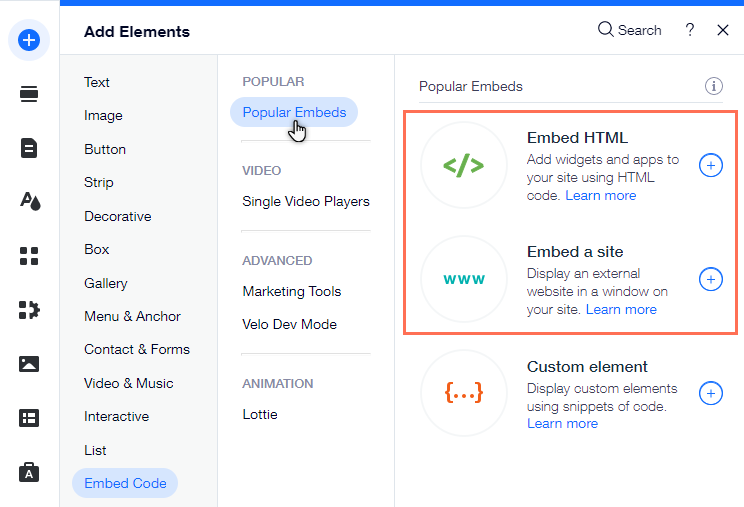
To install any of our widgets on Wix you will need to use the Embed HTML element inside the Wix website builder.
You then need to select the Code option and then simply paste in your widget code .
You can install multiple Free Seller Tools widgets on the same page to create a more comprehensive and informative experience for your visitors. For example, you could have one widget displaying your latest eBay listings, another widget displaying your feedback, and a third widget displaying your seller profile.
Currently, you can only install one instance of a widget on the same page. Installing multiple instances of the same widget will result in none of the widgets loading.
Installing Free Seller Tools widgets is a simple process of copying and pasting code into your website where you want the widget to appear.
For HTML-based websites, edit your HTML page and paste the code. For WordPress, Wix, and other website builders, insert the code using an HTML module or code editor (see specific instructions below).
The required code is generated automatically for you. Simply select the widget you want to use and fill in the relevant details, including a valid eBay ID and eBay site.
Your eBay ID is your eBay username and must exactly match the account registered on eBay. Your eBay site is the main country site where you sell and where you want the widget links to point. For example, if you primarily sell in the UK, you would select eBay UK. This would mean that all links would redirect to ebay.co.uk and all currency symbols would be shown in GBP (£).
Installing Free Seller Tools widgets on WordPress depends on your WordPress theme. If you are using a standard block-based theme, you can install the widget code snippet using the Custom HTML block. If you are using a premium theme that includes its own page builder, you will need to use the theme builder's HTML code module.
Due to the vast number of WordPress themes available, it is best to consult your theme's documentation for specific instructions.
It is important to note that you cannot use Free Seller Tools widgets on the hosted WordPress.com platform, as dynamic content is restricted. The code snippet will only work with self-hosted versions of WordPress.
Here are some additional tips for installing Free Seller Tools widgets on WordPress:
Make sure you have a valid eBay ID and eBay site before you begin.
Back up your WordPress site before making any changes.
If you are not comfortable inserting the code snippet, you can hire a WordPress developer to help you.
To install any of our widgets on Wix you will need to use the Embed HTML element inside the Wix website builder.
You then need to select the Code option and then simply paste in your widget code .
You can install multiple Free Seller Tools widgets on the same page to create a more comprehensive and informative experience for your visitors. For example, you could have one widget displaying your latest eBay listings, another widget displaying your feedback, and a third widget displaying your seller profile.
Currently, you can only install one instance of a widget on the same page. Installing multiple instances of the same widget will result in none of the widgets loading.